
357PK Game Deposit
Making a deposit is an important step for users who want to add funds to their gaming account. 357PK Game supports popular Pakistani mobile payment services, including JazzCash and Easypaisa, making the process simple for users who prefer local payment options.
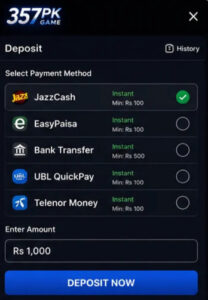
Whether you are using an Android phone or accessing the platform through a mobile browser, you can add balance by selecting your preferred payment method and following the provided instructions.
How to Deposit on 357PK Game
Adding funds does not require complicated steps. Before starting, make sure your JazzCash or Easypaisa account has sufficient balance and that you are using the correct account details.
Step 1: Log In to Your 357PK GameAccount
Open the official platform and sign in with your registered account details. Make sure you are logged into the correct profile before proceeding with a payment.
Step 2: Open the Deposit Section
After logging in, go to your account dashboard and select the Deposit option. The available payment methods and deposit instructions will appear on the screen.
Step 3: Select JazzCash or Easypaisa
Choose the payment service you want to use. Pakistani users can select either JazzCash or Easypaisa, depending on their preferred payment account.
Step 4: Enter the Deposit Amount
Enter the amount you want to add to your account. Always check the minimum and maximum limits shown on the payment page before confirming the transaction.
Step 5: Complete the Payment
Follow the instructions displayed for the selected payment method. Double-check the recipient information and amount before sending funds.
Step 6: Confirm Your Deposit
Once the payment has been completed, return to the deposit page if confirmation is required. Keep your transaction reference or payment screenshot until the balance has been successfully updated.
Deposit With JazzCash
JazzCash is a widely used mobile wallet in Pakistan and can be used when it is available as a supported payment option.
To make a deposit through JazzCash:
- Open your account and select Deposit.
- Choose JazzCash from the available methods.
- Enter your desired amount.
- Check the displayed payment information carefully.
- Send the required amount through your JazzCash account.
- Complete any confirmation step requested by the platform.
- Keep the transaction reference for future support if required.
Do not send money to an account or number that is not displayed through the official payment instructions.
Deposit With Easypaisa
Easypaisa provides another convenient option for users who prefer mobile wallet payments.
The general process is:
- Sign in to your account.
- Open the Deposit section.
- Select Easypaisa.
- Enter the amount you want to add.
- Review the payment details.
- Complete the transfer from your Easypaisa account.
- Save the transaction ID or confirmation message.
The balance may take some time to update depending on the payment system and account verification process.
Tips for a Safer Deposit
Before adding funds, always verify the payment details shown on the official platform. Use your own registered payment account and make sure the amount is correct before confirming.
It is also useful to keep payment records until the transaction has been completed successfully. If a person claims to represent customer support and asks for your wallet password or OTP, do not provide it.
Frequently Asked Questions
Can I deposit through JazzCash?
Yes, JazzCash can be used when it is listed as an available payment method on the deposit page.
Is Easypaisa available for deposits?
Easypaisa can be used when the service is supported and displayed among the available payment options.
What if my balance does not update?
Check your payment history and transaction reference first. If the payment was completed successfully but the balance remains unchanged, contact the platform’s support team.